UNAM 2024 Admission Exam Results

We will web scrape the tables from the results pages
Example link = https://www.dgae.unam.mx/Licenciatura2024/resultados/15.html
In [ ]:
import requests
from bs4 import BeautifulSoup
from urllib.request import Request, urlopen
import pandas as pd
from urllib.error import URLError, HTTPError
from http.client import RemoteDisconnected
import time
import numpy as np
Let us begin by scraping the catalogue of courses in UNAM
In [ ]:
# Request to the site where the catalog is
req = Request(
    url='https://www.dgae.unam.mx/planes/licenciatura.html',
    headers={'User-Agent': 'Mozilla/5.0'}
)
catalog = urlopen(req).read()

# Parse the HTML content
soup = BeautifulSoup(catalog, 'html.parser')

table = soup.find('table', {'class': 'table table-hover sortable results'})

# Extract table headers
headers = []
for th in table.find_all('th'):
    headers.append(th.get_text(strip=True).replace('\n', ' '))

# Extract table rows
rows = []
for tr in table.find_all('tr')[2:]:  # Skip the header row and warning row
    cells = tr.find_all('td')
    if len(cells) > 0:
        row = []
        for td in cells:
            # Get text or href if it's a link
            link = td.find('a')
            if link:
                row.append(link.get('href', ''))
            else:
                row.append(td.get_text(strip=True))
        rows.append(row)

# Create a data frame with the data
catalogo = pd.DataFrame(rows)
# Drop the columns without description
catalogo = catalogo.drop(range(6,12), axis=1)
catalogo.columns = headers

# Save the catalog for later
#catalogo.to_csv("catalogo_carreras.csv")

#catalogo
In [ ]:
catalogo.shape
# We'll only work with the 'escolarizado' system
catalogo = catalogo[catalogo['Sistema']=='Escolarizado']
catalogo['Sistema'].value_counts()
Out[ ]:
Sistema
Escolarizado    201
Name: count, dtype: int64
Now let's go through courses in the 'in-person' mode (escolarizado)
In [ ]:
# Notice that the name of the html files with the exam results are made of: AREA/CLAVECARRERA+CLAVEPLANTEL+5 #No idea why the 5 tho

# List to store URLs that didn't work
failed_urls = []
names_failed = []

# List to store the 'byte'-type webpage content
webpages = []
names_carreras_found = []

for i in range(catalogo.shape[0]):
    url = str('https://www.dgae.unam.mx/Licenciatura2024/resultados/' + catalogo.iloc[i]['ClaveCarrera'][0] + '/' +
              catalogo.iloc[i]['ClaveCarrera'] + catalogo.iloc[i]['ClavePlantel'] + str(5) + '.html')
    req = Request(url, headers={'User-Agent': 'Mozilla/5.0'})

    retries = 3
    for attempt in range(retries):
        try:
            webpage = urlopen(req).read()
            webpages.append(webpage)  # Store the 'byte'-type webpage content
            names_carreras_found.append(catalogo.iloc[i]['ClaveCarrera']+'_'+catalogo.iloc[i]['Carrera'] +'_'+ catalogo.iloc[i]['ClavePlantel'])
            # Process the soup object to find the table
            break  # If successful, exit the retry loop
        except HTTPError as e:
            if e.code == 404:
                print(f'HTTPError 404: {url} not found.')
                failed_urls.append(url)
                names_failed.append(catalogo.iloc[i]['ClaveCarrera']+'_'+catalogo.iloc[i]['Carrera'] +'_'+ catalogo.iloc[i]['ClavePlantel'])
                break  # For 404 errors, log and skip to the next URL
            else:
                print(f'HTTPError: {e.code} - {e.reason}')
        except URLError as e:
            print(f'URLError: {e.reason}')
        except RemoteDisconnected as e:
            print(f'RemoteDisconnected: {e}')
        except Exception as e:
            print(f'Unexpected error: {e}')

        if attempt < retries - 1:
            print('Retrying...')
            time.sleep(2)  # Wait before retrying
        else:
            print(f'Failed to retrieve the webpage after several attempts: {url}')
            failed_urls.append(url)

# Finally, check that the errors correspond to courses who did not participate in the 2024 exam
HTTPError 404: https://www.dgae.unam.mx/Licenciatura2024/resultados/1/13800805.html not found.
HTTPError 404: https://www.dgae.unam.mx/Licenciatura2024/resultados/1/12710005.html not found.
HTTPError 404: https://www.dgae.unam.mx/Licenciatura2024/resultados/1/10500015.html not found.
.
.
.
HTTPError 404: https://www.dgae.unam.mx/Licenciatura2024/resultados/4/43400025.html not found.
HTTPError 404: https://www.dgae.unam.mx/Licenciatura2024/resultados/4/43400545.html not found.
HTTPError 404: https://www.dgae.unam.mx/Licenciatura2024/resultados/4/44006005.html not found.
Finally, run a scraping on the list of webpages as we did for the catalogue
Visualicemos los datos extraídos
La información obtenida se ve algo así
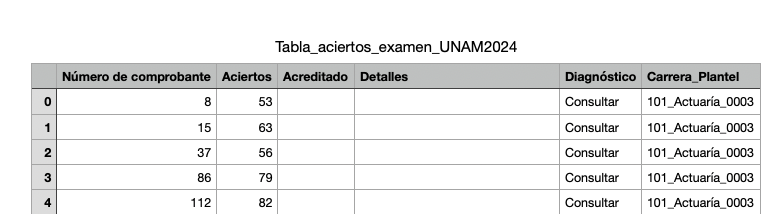
donde la columna Número de comprobante funciona como un índice, Acreditado contiene la información
sobre si el aspirante presentó el examen, y en caso afirmativo si fue aceptado o no. Por último, la columna Carrera_Plantel nos permite hacer una estratificación de los resultados y visualizar un montón de cuestiones interesantes.
Para hacer las visualizaciones utilicé Plotly y el repositorio con el código para realizar las visualizaciones está en mi Github
Demanda y dificultad (aciertos mínimos): En esta gráfica (treemap) el tamaño de
los mosaicos representa el número de aspirantes que presentaron examen. Clica en el nombre del área para maximizar las carreras.
Distribución del puntaje por área: cada (medio) violín corresponde a la distribución del número
de aciertos en cada área.
El rectángulo inscrito es un boxplot y la linea que lo parte corresponde a la mediana de los puntajes obtenidos por los aspirantes
(la mitad de ellos tienen puntajes menores, y la otra mitad mayores). Yo no los veo tan distintos.
El rectángulo inscrito es un boxplot y la linea que lo parte corresponde a la mediana de los puntajes obtenidos por los aspirantes
(la mitad de ellos tienen puntajes menores, y la otra mitad mayores). Yo no los veo tan distintos.
Puntaje por carrera en área 1: cada boxplot corresponde a una carrera, están ordenadas ascendentemente
respecto
al número de aciertos promedio. Clica en los nombres a la derecha para filtrar y comparar.
Los nombres de carrera con asterisco indican que la carrera se imparte en más de un plantel, y la estrella corresponde al puntaje mínimo para ser aceptado.
al número de aciertos promedio. Clica en los nombres a la derecha para filtrar y comparar.
Los nombres de carrera con asterisco indican que la carrera se imparte en más de un plantel, y la estrella corresponde al puntaje mínimo para ser aceptado.
Puntaje por carrera en área 2: cada boxplot corresponde a una carrera, están ordenadas ascendentemente
respecto
al número de aciertos promedio. Clica en los nombres a la derecha para filtrar y comparar.
Los nombres de carrera con asterisco indican que la carrera se imparte en más de un plantel, y la estrella corresponde al puntaje mínimo para ser aceptado.
al número de aciertos promedio. Clica en los nombres a la derecha para filtrar y comparar.
Los nombres de carrera con asterisco indican que la carrera se imparte en más de un plantel, y la estrella corresponde al puntaje mínimo para ser aceptado.
Puntaje por carrera en área 3: cada boxplot corresponde a una carrera, están ordenadas ascendentemente
respecto
al número de aciertos promedio. Clica en los nombres a la derecha para filtrar y comparar.
Los nombres de carrera con asterisco indican que la carrera se imparte en más de un plantel, y la estrella corresponde al puntaje mínimo para ser aceptado.
al número de aciertos promedio. Clica en los nombres a la derecha para filtrar y comparar.
Los nombres de carrera con asterisco indican que la carrera se imparte en más de un plantel, y la estrella corresponde al puntaje mínimo para ser aceptado.
Puntaje por carrera en área 4: cada boxplot corresponde a una carrera, están ordenadas ascendentemente
respecto
al número de aciertos promedio. Clica en los nombres a la derecha para filtrar y comparar.
Los nombres de carrera con asterisco indican que la carrera se imparte en más de un plantel, y la estrella corresponde al puntaje mínimo para ser aceptado.
al número de aciertos promedio. Clica en los nombres a la derecha para filtrar y comparar.
Los nombres de carrera con asterisco indican que la carrera se imparte en más de un plantel, y la estrella corresponde al puntaje mínimo para ser aceptado.